To assess the scientific activity of researchers, scientometric indicators like the Hirsch index are commonly used. This index helps determine a scientist's influence within their field. To calculate the Hirsch index, it’s crucial to have accurate citation data from other researchers, which can be found on the Google Scholar platform. However, sometimes citation data may not appear in a scientist's personal profile. This can lead to incorrect calculations of the Hirsch index and other scientometric indicators, potentially affecting the objective evaluation of a researcher’s work. In this article, we will explain what to do in such cases and provide a step-by-step guide to resolving the issue.
To write our article, we took random publications as examples.
What information about articles can be found in Google Scholar?
A special feature of the Google Scholar search engine is the information it provides about scholarly articles. In the screenshot below you can see that under each scholarly article there is data on similar articles, the number of its versions and citations by other scholars. The platform also provides information about the author, and adds each of their publications to their personal Google Scholar profile.

For example, the article in the screenshot above has been cited twice. If we click on the ‘Cited in 2 sources’ link, we will see a list of scientific papers in which it is cited. In this way, we can track how often other scientists cite a particular article in their research.

However, there are cases when citation data for an article is missing from a scientist's profile, even though it has been actively cited by other researchers. In such situations, it’s necessary to manually link the publication with its citations. Below, we will explain how to do this.
Step-by-step instructions for merging an article and its citations in Google Scholar
Let's take an example of an article whose citations are not displayed in the scholar's Google Scholar profile. In the image below, the area marked with a question mark should indicate the number of citations of this publication, but this information is missing.

We encounter this problem not only in the scholar's profile, but also when searching for an article via the search bar. How to fix it?

Course of action:
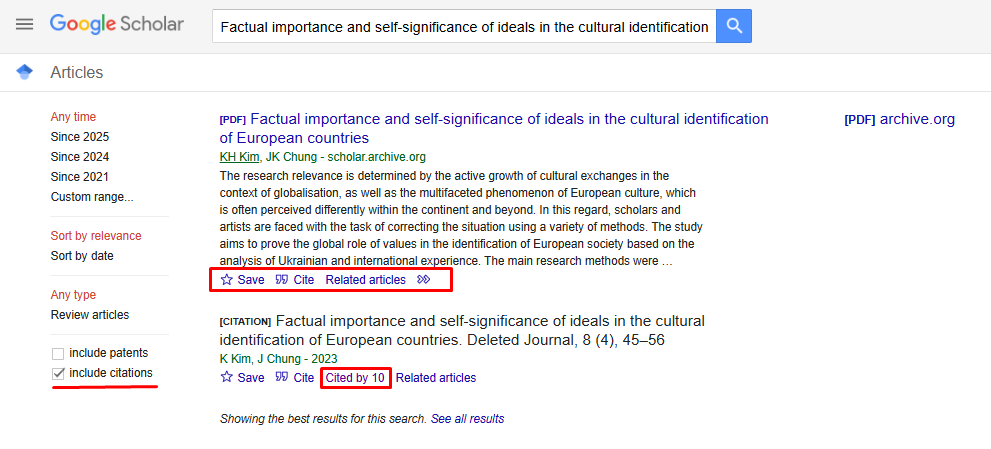
1. Search query. Make sure that ‘include citations’ is selected in the left sidebar when searching for the article you are looking for. This will allow you to take citations into account when searching for publications. For example, in the illustration below you can see the results of a Google Scholar search query.
At first glance, it may seem that we are looking at two identical publications. However, despite the similarity in titles, only the first citation leads to the article. The second result is a separate citation entry that indicates how many times other researchers have cited the paper. The phrase "Cited by 10" means that the article has been cited 10 times.
2. Adding an article. After you have made a search query, you need to go to your Google Scholar profile and click on the "Add article" button (it is marked with a red square in the image below).

After that, a window with a search box will pop up, into which you need to enter the full title of the citation record (the second result of our query).
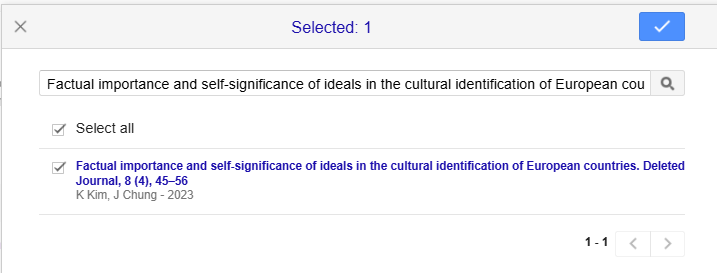
3. Merging. The next step is to merge two records into one. To do this, tick the article and the citation, and then click on the ‘Merge’ button (as shown in the illustration below).

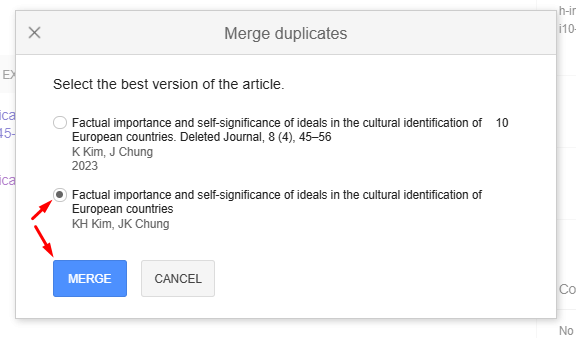
Subsequently, a window opens in front of us, where we should select the correct publishing option. Accordingly, we mark not the citation, but the main article entitled "Factual importance and self-significance of ideals in the cultural identification of European countries" and click "Merge".
Done! One coherent article with the specified number of citations has now appeared in the scholar's Google Scholar profile. All subsequent references to this study in the works of other scientists will be automatically added to the main article, which will ensure the accuracy of its citation data. Thus, it is possible to correctly calculate the scientometric indicators of researchers and accurately assess their scientific achievements.

In conclusion, it is worth saying that combining an article and its citation in Google Scholar is an important step that contributes to the correct display of the results of a scientist's scientific activity. Correct profile setting allows you not only to avoid errors in citation counting, but also to improve the accuracy of scientometric indicators, such as the Hirsch index. By following our recommendations, you can easily combine your article and citations, thus increasing its visibility among other researchers.
Do you want to increase your citation and Hirsch index in Google Scholar? "Scientific Publications" is ready to help you with this! Our experts will give you a free consultation and develop an individual plan to increase your citation rates that will meet your request. All you need is to fill out the form below and our manager will contact you as soon as possible. Together to new scientific achievements!